


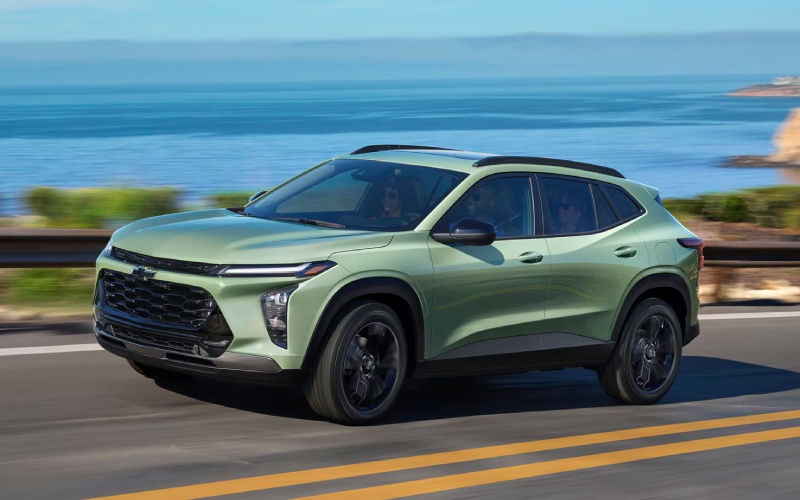
Allen Chevrolet Cadillac of Monroe - Which Small SUV Delivers Better Everyday Tech for Woodhaven, MI Drivers — 2026 Chevrolet Trax or 2026 Honda HR-V?
Why Tech and Safety Are the Deciding Factors
When shoppers in Woodhaven, MI, compare small SUVs, the conversation almost always circles back to technology and safety. The question is straightforward: which model makes everyday driving easier, more connected, and less stressful? In this matchup, both the Trax and HR-V deliver standard advanced driver-assist suites—Chevy Safety Assist and Honda Sensing®, respectively—along with wireless Apple CarPlay® and wireless Android Auto™ across their lineups. But there are key differences that surface once you dig into the details drivers notice most: screen size and layout, device support, and how naturally the systems blend into the rhythm of daily driving.
The Trax leans into simplicity with an available 11-inch center HD touch-screen that places important functions—navigation apps, audio, quick settings—front and center. On select trims, it pairs with an 8-inch diagonal color Driver Information Center for crisp at-a-glance updates. That combination removes the friction of jumping through menus or squinting for small icons. The HR-V serves up a standard 9-inch Color Touchscreen and a 7-inch TFT meter with clear readouts and helpful organization. Both interfaces are good; the advantage of the Trax is extra screen real estate and a layout that keeps more actionable info within a single glance.
Connectivity That Fits Real Life
Here is where many families feel the difference on a Tuesday afternoon: the Trax offers a built-in Wi-Fi® hotspot and available wireless charging. The hotspot turns the cabin into a rolling connection point for school devices and remote work, while wireless charging keeps compatible phones topped up without juggling cables. The HR-V includes a wireless phone charger on select trims and makes life easier with Smart Entry with Walk Away Auto Lock® on upper trims, a helpful quality-of-life touch for busy hands. Both are excellent daily drivers; consider how often passengers ask for a hotspot or how often devices need charging on the go.
It also pays to think about travel beyond town. If your route frequently runs to family, games, or weekend destinations, reliable in-vehicle Wi-Fi is more than a perk; it is a way to keep everyone engaged and your co-pilot connected to route changes in real time. When paired with standard wireless Apple CarPlay and wireless Android Auto, the Trax becomes a hub for your digital life—a seamless extension of your phone that reduces the steps needed to get the right info on the screen.
Driver Assistance: Confidence You Can Feel
Chevy Safety Assist and Honda Sensing® share a common goal—to help you avoid or reduce the severity of collisions. Trax brings Forward Collision Alert, Automatic Emergency Braking, Front Pedestrian Braking, Lane Keep Assist with Lane Departure Warning, a Following Distance Indicator, and IntelliBeam High Beam Assist. HR-V’s Honda Sensing® includes Collision Mitigation Braking System™, Road Departure Mitigation, Adaptive Cruise Control with Low-Speed Follow, Lane Keeping Assist System with Traffic Jam Assist, and Traffic Sign Recognition. HR-V Sport and EX-L add Blind Spot Information System with Cross Traffic Monitor, and EX-L further adds parking sensors. Both offer robust coverage for daily driving, with clear alerts and helpful interventions when needed.
The deciding factor is often how these features feel in action—smooth, predictable, and easy to tailor. Trax benefits from a tidy, modern interface and steering-wheel controls that simplify toggling assistance or customizing alerts. HR-V’s Traffic Jam Assist and low-speed adaptive cruise are welcome in creeping congestion. Your best next step is to test both systems along your regular route and see which one feels more natural with your driving style and traffic patterns.
User Interface: Big-Screen Advantage
Even small UI design choices add up over years of ownership. Trax’s available 11-inch display creates a generous canvas for split screens and large icons, reducing cognitive load at highway speeds. The HR-V’s 9-inch Color Touchscreen is bright and quick, with a logical layout and a physical volume knob many drivers appreciate. Neither system forces you into a steep learning curve. If you prefer having more information visible at once—think mapping plus media plus a quick setting—the Trax’s screen size advantage is compelling. If you value a familiar, streamlined layout with a tactile volume control, the HR-V is easy to love.
It is also worth noting cabin quietness and clarity of alerts. The Trax’s Active Noise Cancellation helps lower ambient noise, which can improve the clarity of prompts and allow for softer voice commands in the cabin. The HR-V’s well-isolated ride and multi-link rear suspension contribute to a settled feel over broken pavement, supporting consistent alert comprehension and reduced fatigue on longer drives.
How to Decide in a Single Visit
Make your evaluation systematic. Start with a short loop that replicates your weekday mix of surface streets and highways. Confirm your phone pairs wirelessly in both, then set a destination and stream your go-to podcast to gauge hardware speed, Bluetooth handoff, and audio clarity. Try a few driver-assist features—lane centering, following distance, auto high beams—and note how intuitive it is to adjust settings. Finally, assess in-cabin convenience: a wireless charger placement that does not hog cupholders, a screen you can read in bright light, and rear-seat space that fits a rear-facing car seat or a lanky teen.
To keep impressions straight, capture quick notes right after each drive. For many shoppers, the decision becomes clear during those back-to-back moments—especially when you return to the controls without a salesperson’s input. An SUV that feels like second nature from day one tends to stay that way after year one.
When you are ready for a side-by-side, visit Allen Chevrolet Cadillac of Monroe for a focused comparison tailored to how you drive. Our team can walk you through Trax’s available 11-inch display, standard wireless smartphone integration, and available built-in Wi-Fi hotspot, then align trims and options to your non-negotiables.
We are proud to help shoppers near the corridor serving Toledo, OH, Woodhaven, and Taylor, MI, make smart, confident choices. If your must-have list reads like “wireless, seamless, hassle-free,” the Trax checks boxes with room to spare. If you prioritize AWD and a moonroof, the HR-V’s upper trims may speak to you. Either way, bringing your routine into the test drive—kids, car seats, devices—reveals the right answer faster than any spec sheet can.
Frequently Asked Questions:
Does the Trax support wireless Apple CarPlay and Android Auto?
Yes. Wireless Apple CarPlay and wireless Android Auto are standard on every Trax trim, so connecting your phone is quick and cable-free.
Does the HR-V offer a built-in Wi-Fi hotspot?
The HR-V emphasizes smartphone integration and available wireless charging. A built-in Wi-Fi hotspot is not listed among HR-V features, while it is available on the Trax.
Which SUV has the larger touch-screen?
Trax offers an available 11-inch center HD touch-screen. HR-V features a standard 9-inch Color Touchscreen.
Can I get blind spot monitoring on both?
HR-V Sport and EX-L include Blind Spot Information System with Cross Traffic Monitor. Trax offers a robust standard Chevy Safety Assist suite, and additional driver-assist features are available by trim.
Which is better for families who work and learn on the go?
Both are capable, but the Trax’s available built-in Wi-Fi hotspot plus standard wireless smartphone integration make it especially suited for connected households.