


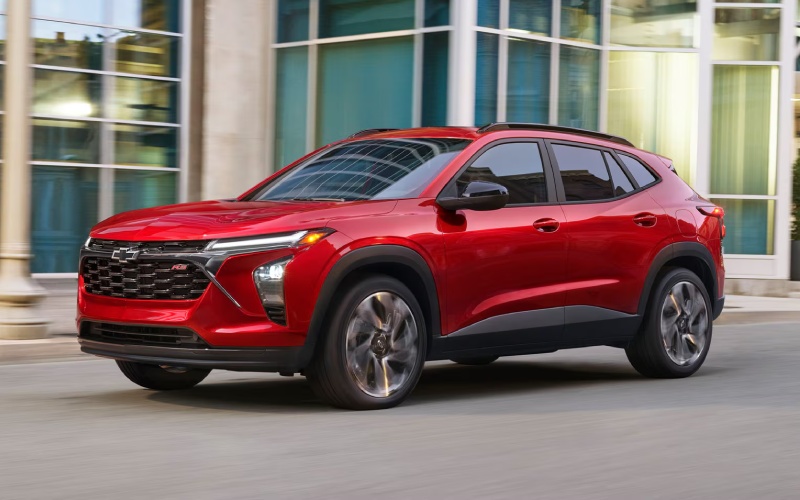
Allen Chevrolet Cadillac of Monroe - What comes standard in Chevy Safety Assist on the 2026 Chevrolet Trax for Taylor, MI commutes?
Chevy Safety Assist is standard across the 2026 Chevrolet Trax lineup, and for drivers navigating Taylor, MI’s mix of surface streets, school zones, and freeway on-ramps, the technology set provides a reassuring safety net. The suite is designed to support alert, responsible driving by helping detect and respond to specific situations where a split second matters.
Below, we’ll break down what’s included, how each system helps in day-to-day driving, and what to look for during your test drive so you leave confident and informed.
What Chevy Safety Assist Includes
Chevy Safety Assist is a collection of six features that work together to promote safer driving. While none replace your attention, each one can provide alerts or assistance when conditions call for it.
- Forward Collision Alert: Monitors for a potential front-end collision and can warn you to take action.
- Automatic Emergency Braking: Can assist with hard braking to help reduce the severity of or avoid certain front-end collisions.
- Front Pedestrian Braking: Helps detect a pedestrian ahead and can provide alerts and hard braking assistance.
- Lane Keep Assist with Lane Departure Warning: Provides gentle steering assistance to help keep you centered and can alert you if you unintentionally drift.
- Following Distance Indicator: Displays your gap to the vehicle ahead to help manage space in traffic.
- IntelliBeam® High Beam Assist: Automatically toggles high beams on and off based on surrounding traffic at night.
On busy stretches near Eureka Road or during early-morning commutes, these features work in the background, offering additional awareness and timely prompts to support better decision-making.
How the Systems Work Day to Day
Forward Collision Alert and Automatic Emergency Braking are most noticeable when traffic compresses suddenly, or a vehicle ahead brakes harder than expected. You’ll first receive an alert; if you don’t respond quickly enough, Automatic Emergency Braking can assist. Front Pedestrian Braking focuses on pedestrian detection—especially helpful in shopping areas and near crosswalks where visibility can change quickly.
Lane Keep Assist with Lane Departure Warning may gently nudge the wheel if you drift without signaling. It’s designed to help in moments of distraction, like while checking a wayfinding sign. Following Distance Indicator continuously displays your gap to the vehicle ahead, which can improve lane discipline and reduce tailgating on I-94 or Telegraph Road. At night, IntelliBeam® High Beam Assist switches between low and high beams based on detected traffic, so you’re not constantly toggling the stalk while scanning for turns or driveways.
Trim Differences and Available Tech
The great news is that Chevy Safety Assist is standard on every 2026 Chevrolet Trax, whether you choose LS, 1RS, LT, 2RS, or ACTIV. If you like a sportier aesthetic, the RS trims add distinctive details like RS badging and unique black exterior elements—2RS also steps up wheel size. ACTIV brings Titanium chrome exterior accents, blackout wheels, and unique interior touches that feel confidently bold.
Beyond safety, standard wireless Apple CarPlay® and wireless Android Auto™ simplify phone integration, while an available 11-inch center HD touch-screen and available wireless charging enhance everyday usability. An available built-in Wi-Fi® hotspot supports passengers who need to connect on the go. This combination of standard safety and thoughtful tech helps the Trax feel modern without being complicated.
Test-Drive Checklist for Safety Tech
To make sure Chevy Safety Assist fits your needs, plan a test drive that lets you experience how the systems work in realistic conditions. Here’s a simple approach.
- Check system status: With the vehicle in Park, explore the menus to see how alerts and assistance features are displayed and toggled.
- Drive a mixed route: Include neighborhood streets, a few stoplights, and a stretch of highway to observe alerts and lane guidance.
- Evaluate visibility: Note sightlines at intersections and try IntelliBeam® on a safe, lightly traveled road after dusk if possible.
- Mind your following distance: Use the Following Distance Indicator to gauge and adjust your spacing in traffic.
- Ask for a feature demo: Request that a product specialist walk you through real-time examples so you know what alerts look and sound like.
This measured approach ensures you leave with a clear sense of when each system activates, how it communicates, and what you can expect in daily use.
Frequently Asked Questions:
Does Chevy Safety Assist work in bad weather?
Performance can be affected by visibility, weather, and road conditions. Heavy rain, snow, or grime over sensors and cameras can limit system operation. It’s important to keep sensors clean and continue to drive attentively—these features are designed to support, not replace, safe driving.
Can I turn individual features on or off?
Yes. Most functions offer menu settings where you can adjust alert timing or toggle features within parameters. During your test drive, ask a product specialist to show you where these settings live so you can tailor them to your preferences.
Is IntelliBeam® always active at night?
IntelliBeam® High Beam Assist activates under certain conditions, such as speed, ambient lighting, and detected traffic. If the system senses oncoming vehicles or traffic ahead, it will automatically switch to low beams and return to high beams once the road is clear.
Do I need to choose a specific trim for Chevy Safety Assist?
No—Chevy Safety Assist is standard on every 2026 Chevrolet Trax trim. You can choose the styling and interior features you want without sacrificing the core driver-assistance suite.
For added context, standard wireless Apple CarPlay® and wireless Android Auto™ complement those safety features by reducing clutter and keeping navigation and audio controls intuitive. If you spend time carpooling or shuttling between errands, consider the available 11-inch center HD touch-screen for a clearer map view and the available built-in Wi-Fi® hotspot for passengers who need to stay connected.
If you’re ready to explore a Trax and see Chevy Safety Assist in action, our team is here to help—Allen Chevrolet Cadillac of Monroe is serving Toledo, Woodhaven, and Taylor with knowledgeable guidance and hands-on demonstrations tailored to your routine. We’ll walk you through each feature, recommend a test-drive route that mirrors your commute, and help you compare trims so you choose with confidence.